Audio Steganography with miniDSP
What if you could hide a secret message inside a song, a podcast, or a voice memo - and nobody would ever know it was there? That’s steganography. And it’s been around way longer than computers.
A Quick History of Steganography
Steganography comes from the Greek steganos (covered) and graphein (writing). The idea is simple: conceal a message inside something that doesn’t look like a message at all. Cryptography makes a message unreadable. Steganography hides the fact that a message even exists.
The concept is ancient. Herodotus wrote about a Greek messenger who shaved his head, had a message tattooed on his scalp, waited for his hair to grow back, and then just walked right past enemy guards. (Pretty clever!) In the Renaissance, people used invisible inks made from milk, lemon juice, or urine - messages that only appeared when heated. And during World War II, the Germans used microdots - tiny photographs shrunk to the size of a printed period - to smuggle intelligence through the mail.
In the digital world, same principle: hide data inside something innocuous. Images are the most common carrier (tweaking pixel values in ways the eye can’t detect), but audio turns out to be a really interesting medium too.
Why Audio?
Audio signals have some great properties for hiding data:
High data rates. A CD-quality audio stream is 44,100 samples per second at 16 bits each. That’s a lot of bits to work with.
Perceptual masking. Human hearing has well-known limitations. We can’t hear extremely quiet sounds, we can’t hear frequencies above ~20 kHz, and loud sounds mask nearby quiet ones. All of that creates room to hide data without anyone noticing.
They’re everywhere. Music, podcasts, voicemails, video soundtracks. An audio file doesn’t attract suspicion.
I recently added an audio steganography module to miniDSP that implements three different hiding techniques, each with its own strengths and weaknesses. Here’s how they work.
Method 1: Least Significant Bit (LSB)
This is the simplest approach - and the one with the highest capacity.
In a 16-bit audio sample, the least significant bit contributes just 1/32,767 of the signal amplitude - roughly −90 dB. Flipping that bit is completely inaudible.
So the idea is: take each audio sample, replace its least significant bit with one bit of your secret message. The receiver reads those bits back out. That’s it.
Capacity: ~1 bit per sample. At 44.1 kHz, that’s about 5.5 KB per second - enough to hide an entire document in a short audio clip.
Audibility: Effectively zero. The distortion is ~90 dB below the signal.
Robustness: Fragile. Any re-encoding (MP3 compression, format conversion) destroys the hidden data. This works best in lossless pipelines - WAV, FLAC, that sort of thing.
Want to hear what it sounds like? Here’s the original host signal (a 440 Hz sine wave), and then the same signal after LSB encoding. Try to hear the difference - you won’t:
Original:
After LSB encoding:
Here’s what the code looks like with the miniDSP API:
#include "minidsp.h"

double host[44100], stego[44100];
MD_sine_wave(host, 44100, 0.8, 440.0, 44100.0);

// Encode a secret message
unsigned n = MD_steg_encode(host, stego, 44100, 44100.0,
    "secret message", MD_STEG_LSB);

// Decode it back
char recovered[256];
MD_steg_decode(stego, 44100, 44100.0, recovered, 256, MD_STEG_LSB);
printf("Hidden: %s\n", recovered);  // "secret message"
You can also hide binary data - images, files, whatever - using MD_steg_encode_bytes() and MD_steg_decode_bytes(). Here’s a fun example: this tiny space invader sprite gets hidden inside audio via LSB, then perfectly recovered:


Method 2: Frequency-Band Modulation (BFSK)
This one takes a completely different approach. Instead of tweaking individual sample values, it hides data in the frequency domain using Binary Frequency-Shift Keying (BFSK) in the near-ultrasonic range.
Two carrier frequencies encode binary data:
- 18,500 Hz = bit 0
- 19,500 Hz = bit 1
Each bit gets a 3-millisecond “chip” - a short burst of a sine wave at one of those two frequencies, mixed into the audio at −34 dB. Most adults can’t hear anything above 17-18 kHz, so the carriers sit right in that perceptual dead zone.
The decoder correlates each chip against both carriers and picks the stronger match. Pretty elegant.
Here’s the BFSK-encoded version of the same host signal. Again, try to hear the hidden data:
Capacity: Lower than LSB - about 2.6 kbit/s (roughly 121 bytes in 3 seconds of audio). You’re not hiding War and Peace this way.
Audibility: Near-inaudible. The tones are ultrasonic and quiet (−34 dB).
Robustness: Moderate. It survives mild additive noise, but it’s vulnerable to low-pass filtering above 18 kHz.
Requirement: Sample rate must be ≥ 40 kHz to represent the carrier frequencies.
#include "minidsp.h"

double host[132300], stego[132300];  // 3 seconds at 44.1 kHz
MD_sine_wave(host, 132300, 0.8, 440.0, 44100.0);

// Encode using frequency-band method
MD_steg_encode(host, stego, 132300, 44100.0,
    "hidden", MD_STEG_FREQ_BAND);

// Decode
char recovered[256];
MD_steg_decode(stego, 132300, 44100.0,
    recovered, 256, MD_STEG_FREQ_BAND);
Method 3: Spectrogram Text (Spectext)
OK, this is the fun one - and honestly my favorite of the three.
I wrote about the spectrogram text rendering in a previous post, but spectext takes it a step further by combining two things:
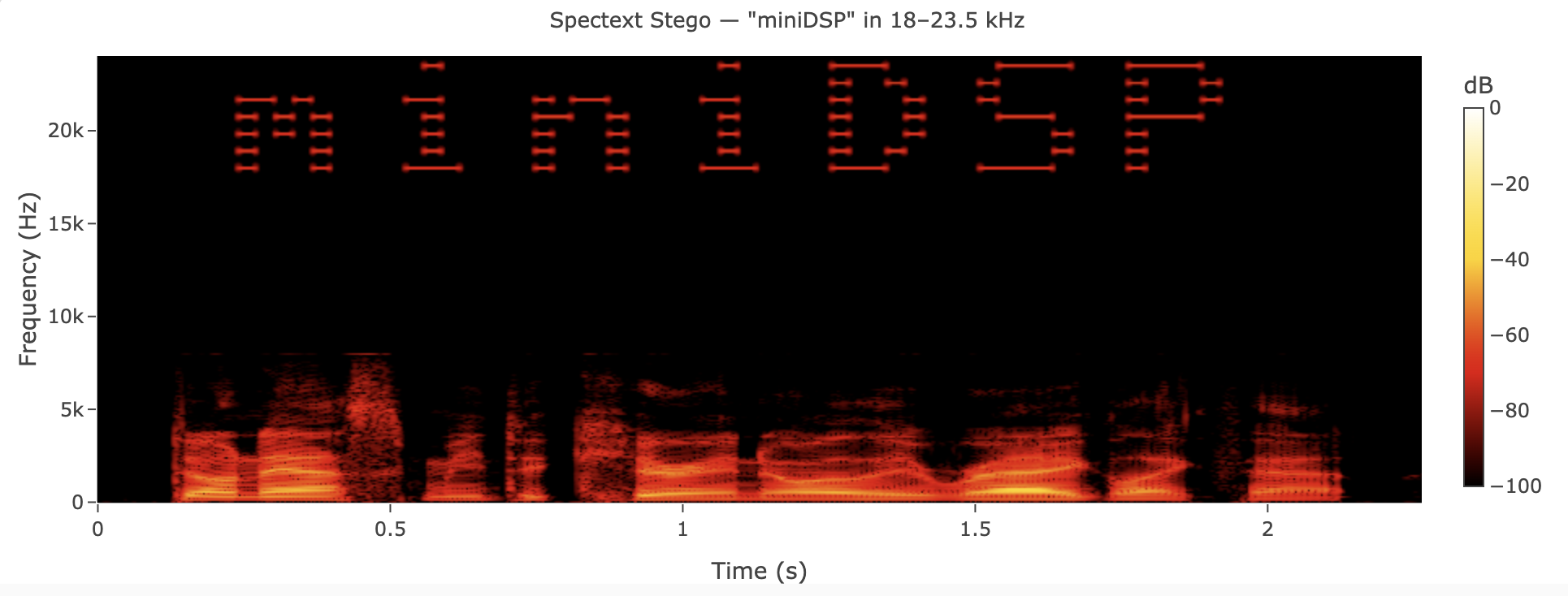
- Visual art - Text is rendered as sine waves in the 18-23.5 kHz ultrasonic band, so it shows up as readable text when you view the spectrogram.
- Machine-readable data - LSB encoding hides the actual message bytes in the audio samples.
The result is a signal that’s inaudible (all the action is above 18 kHz), visually readable in a spectrogram, and machine-decodable. Dual-channel steganography - one channel for human eyes, one for software. I think that’s really cool.
Under the hood, the spectext encoder automatically upsamples the host audio to 48 kHz (if needed) and applies a brick-wall lowpass filter at the original Nyquist frequency to keep the host clean. Then it mixes in the ultrasonic text art and LSB-encodes the payload.
Capacity: Visually, about 4 characters per second. For machine decoding, you get the full LSB capacity of the output signal.
Audibility: Inaudible (ultrasonic frequencies at −34 dB).
Robustness: Fragile - same as LSB, since the machine-readable data uses LSB encoding.
#include "minidsp.h"

double host[132300];  // 3 seconds at 44.1 kHz
MD_sine_wave(host, 132300, 0.8, 440.0, 44100.0);

// Output buffer at 48 kHz (spectext always outputs 48 kHz)
unsigned out_len = MD_resample_output_len(132300, 44100.0, 48000.0);
double *stego = malloc(out_len * sizeof(double));

MD_steg_encode(host, stego, 132300, 44100.0,
    "miniDSP", MD_STEG_SPECTEXT);

// Decode
char recovered[256];
MD_steg_decode(stego, out_len, 48000.0,
    recovered, 256, MD_STEG_SPECTEXT);
Here’s the spectext-encoded audio - the word “miniDSP” is hiding in there, both visually and as machine-readable data:
And here’s what the spectrogram looks like - you can see “miniDSP” sitting in the ultrasonic band above the speech content:
Auto-Detection
One more thing worth mentioning: you don’t need to know which method was used to decode a message. miniDSP includes a detection function that examines the signal and figures it out:
int payload_type;
int method = MD_steg_detect(stego, signal_len, sample_rate, &payload_type);
// method = MD_STEG_LSB, MD_STEG_FREQ_BAND, or MD_STEG_SPECTEXT
// payload_type = MD_STEG_TYPE_TEXT or MD_STEG_TYPE_BINARY
There’s also a command-line tool that wraps all of this - encode, decode, auto-detect - if you want to try it without writing C.
Learn More
- Audio steganography tutorial - full docs with formulas, capacity tables, and more examples
- miniDSP on GitHub - source code, build instructions, and 16+ runnable examples
- Steganography on Wikipedia - deep dive into the history and methods
- Frequency-shift keying on Wikipedia - the modulation technique behind the BFSK method
- Spectrogram Text Art with miniDSP - my earlier post on how the text rendering works